
Viewing angle changes perceived chromatic contrast on many LCD and OLED panels, which moves thresholds.
Your Cambridge Color Test Results
Cambridge-style screening measures chromatic distance thresholds along protan, deutan, and tritan axes using a Landolt C gap in noise. Your saved thresholds appear when available.
Cambridge Color Test
You haven't taken this test yet
This page shows your detailed screening result after you complete the test in your browser. Results stay on this device only and are never uploaded.
What you will get on this page
Complete a Cambridge-style run and this page becomes your threshold report. Here is what it will show.
Three axis thresholds side by side
A summary card with your protan, deutan, and tritan thresholds, which axis (if any) sits elevated, and the severity band the elevation falls in.
Thresholds charted against typical
Bars compare each threshold to this site's normal-range marker, and every number comes with a sentence explaining whether that line needed more color contrast than usual.
A personal reading you can act on
A written walkthrough of what an elevated axis means, how it tends to show up in real life, and which cross-check test adds the most information. Downloadable as a PDF report.
Results that never leave this device
Your thresholds are saved in this browser only. Nothing is uploaded, there is no account, and you can clear the saved run with one click.
The sections below explain the staircase method and its scoring, so the three numbers will make sense immediately.
How this test works
A broken ring, a lot of noise, and three invisible lines. Here is what was actually happening.
The ring only exists as a color difference
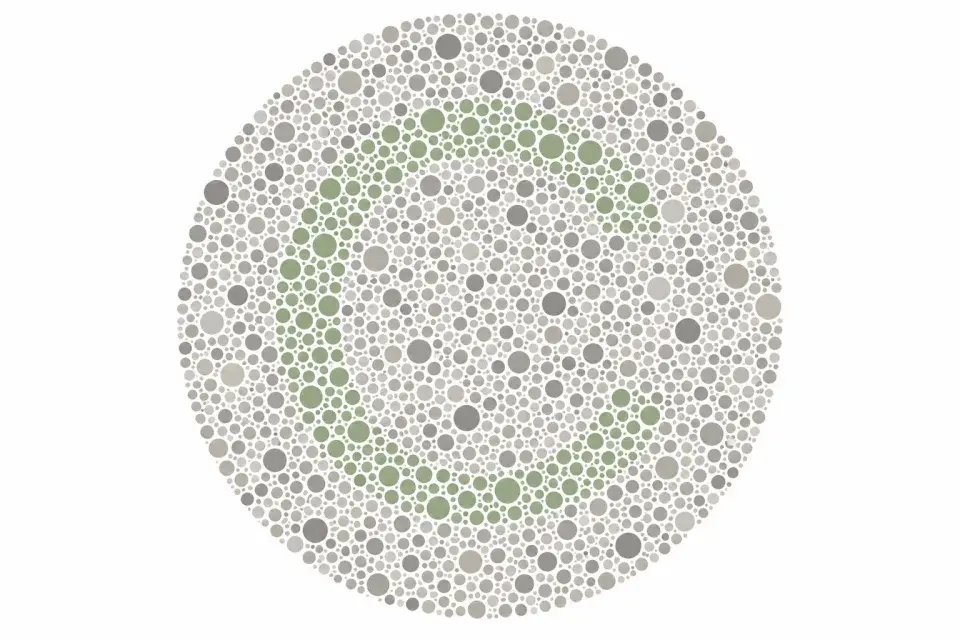
The broken ring you hunted for, like the one hiding in this diagram, is drawn in dots that differ from the background only in color, never in brightness.
The patchy dot sizes and shades are there on purpose. They scramble every brightness clue, so color is the only signal that can reveal where the gap points.
When you answer correctly, the test shrinks the color difference. When you miss, it grows it. This homing-in finds the smallest step you can reliably use.
Three lines, three questions
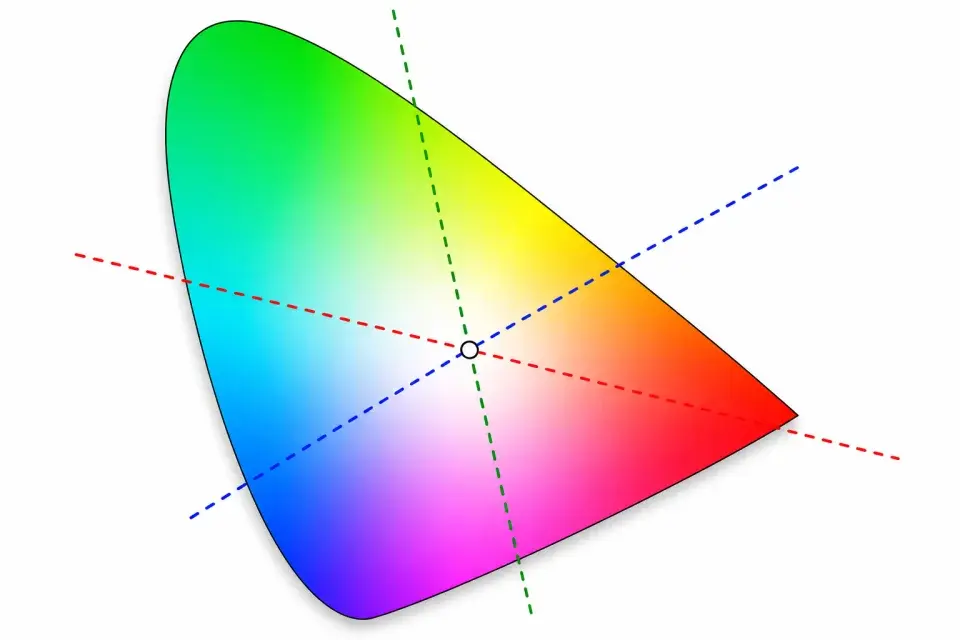
The colors move along three specific directions in color space, shown as the dashed lines here. They are called the protan, deutan, and tritan confusion lines.
Each line is exactly where one cone type struggles most. Colors that sit on the same line send nearly identical signals when that cone is weak, which is what makes them confusable.
That is why the result has three thresholds. A line that needs a much bigger color step than the typical marker is the one this screening flags.
How scoring works
Cambridge-style screening estimates how small a color difference you need before a Landolt C gap stays visible along three confusion axes.
Step 1
Each axis runs an adaptive staircase
Protan, deutan, and tritan staircases ask for the gap direction as color contrast changes. The tool hunts for the smallest difference you can still do reliably on this display.
Step 2
Lower thresholds usually mean finer discrimination
A low bar means you could find the gap with a smaller color step. A higher bar means you needed more contrast before answers stayed reliable.
Step 3
Quick and Standard change trial count
Quick uses fewer trials per axis and finishes faster. Standard gathers more staircase data and is usually steadier near a boundary.
Step 4
The result highlights the raised axis
The tool compares your three thresholds with this site's normal-range markers and flags which axis, if any, sits elevated on this run.
What elevated thresholds suggest
Typical screening
All three axes stayed below the normal-range marker on this run.
Red-green elevation
A raised protan or deutan threshold suggests red-green difficulty on this display.
Tritan elevation
A raised blue-yellow threshold is less common and deserves professional follow-up if it repeats.
Quick vs Standard
Quick (15 trials) thresholds can be less stable. Standard (24 trials) usually gives a steadier estimate. Borderline Quick results are worth confirming with Standard.
What can change your score
Online color tests run on everyday phones and monitors. These limits apply to every result on this site. This is not the Cambridge Research Systems instrument. Numbers here are relative to your display and this site's screening markers.
Your screen is not a clinic display
Brightness, color temperature, Night Shift, True Tone, and browser color handling all change what you see. The same person can score differently on two devices.
Room light and glare matter
A bright window, dim room, or reflections on a glossy screen can hide or exaggerate colors. Steady indoor light and full brightness give the fairest retake.
Glasses and filters can shift results
Tinted lenses, blue-light filters, and accessibility color filters can move scores without reflecting a lasting vision change. Retake without them when you want a cleaner check.
This is screening, not a diagnosis
These tools help you understand a pattern and plan next steps. They are not a medical diagnosis, treatment advice, or clearance for a job or license.
What to do next
- 1
Retake under ideal conditions
Use 100% brightness, turn off Night Shift or True Tone, remove tinted lenses, and sit in steady indoor light before repeating the test.
- 2
Compare with another screening tool
Different tests ask different questions. Plate tests, hue arrangement, matching, and lantern naming can disagree on mild cases.
- 3
See an eye care professional when it matters
Online results are for awareness and education. Occupational certification and clinical diagnosis need supervised in-person testing.
Frequently Asked Questions
Common questions about Cambridge Color Test scoring, saved results, and limits of online screening.
Want updated axis thresholds?
Retake Quick or Standard mode, then reopen this page for your saved thresholds.