
Pair 1 is designed so both halves can match when the slider is near the reference. Most users with a normal setup should accept it.
Your Anomaloscope Test Results
This online matching task approximates the idea of an anomaloscope matching range on red-green or blue-yellow axes. Your saved accept/reject pattern appears when a run is stored in this browser.
Anomaloscope Test
You haven't taken this test yet
This page shows your detailed screening result after you complete the test in your browser. Results stay on this device only and are never uploaded.
What you will get on this page
Finish a matching session and this page becomes your matching range report. Here is what it will contain.
Your accept count and precision
A summary card with how many of the seven pairs you accepted as matches, how precise your control slider was, and the screening band that combination lands in.
Every pair, visualized
A strip shows each color pair from your run, which ones you accepted, which you rejected, and where the control pair sat, with each decision explained in plain words.
A personal reading you can act on
A written walkthrough of what your matching range suggests on the axis you tested, how it compares to a typical run, and what a sensible next step looks like. Downloadable as a PDF report.
Results that never leave this device
Your matches are saved in this browser only. Nothing is uploaded, there is no account, and one click clears the saved session whenever you want.
The sections below explain the matching task and its scoring, so your accept count will make sense right away.
How this test works
The anomaloscope idea is over a century old and it is still the gold standard in clinics. Here is the version you just used.
Can two different mixtures look the same?
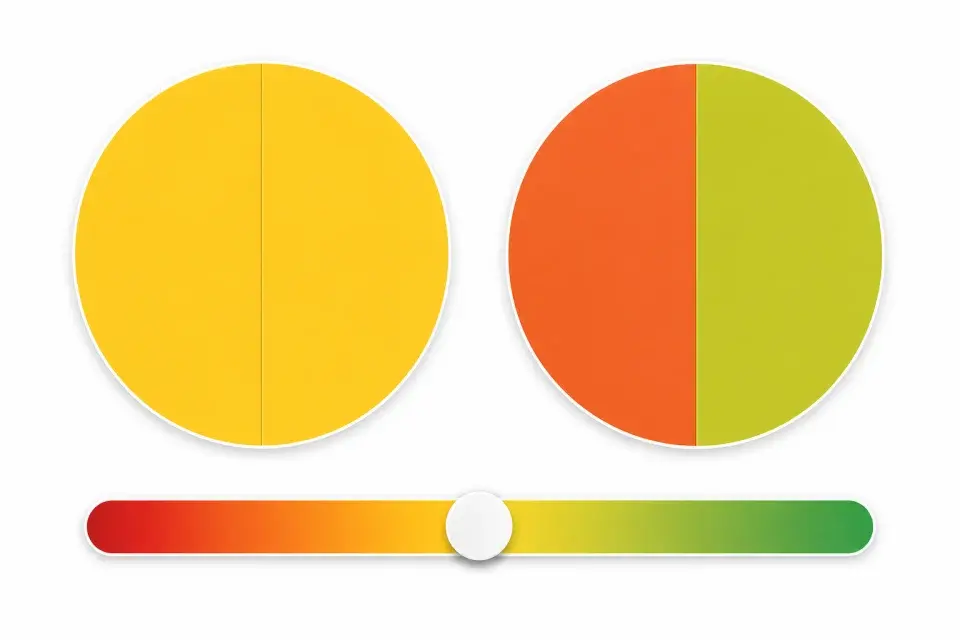
Each pair shows a fixed reference color next to a mixture you control with a slider, like the split discs here. Your job is simple: make them match, or declare that no match is possible.
Only the first pair can truly match. The other six are built slightly off the color axis, so typical vision always spots a difference somewhere and rejects them.
There is no time limit and no trick beyond that. The test only cares about which pairs your eyes were willing to call identical.
More accepted pairs means a wider match zone
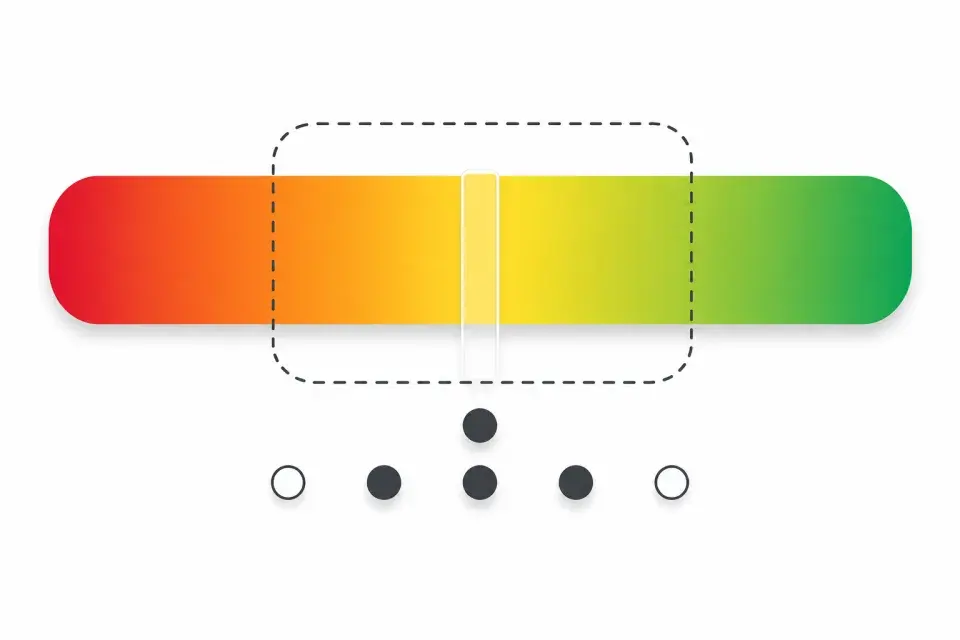
Every mixture sits somewhere on the red-green bar in this diagram. Typical vision only accepts mixtures inside the narrow solid zone in the middle.
If your eye's red or green cones are shifted, the zone that looks identical stretches wider, like the dashed outline. More mixtures fall inside it, so more pairs get accepted.
That is why the accept count is the score: one accept is typical, and each extra accept widens the picture. Clinics measure this same idea with pure light sources and call it the matching range.
How scoring works
This matching task shows seven color pairs on one axis. Scoring is mainly about how many pairs you accept as a match, plus how precise the control slider was.
Step 1
Pair 1 is the control
The control should be matchable when the slider lines up both disc halves. Most people with a normal setup should accept it after careful adjustment.
Step 2
Pairs 2 to 7 are off-axis references
Typical vision usually rejects these as matches. Accepting many of them raises the screening band on this tool.
Step 3
The tool counts accepts and control precision
Normal is control only (1 of 7) with a precise slider (Δ under 10). ImpreciseMatch is also control only, but with an imprecise slider (Δ 10 or higher). Mild, Medium, and Severe need extra accepted pairs. Invalid means zero accepts.
Step 4
Axis choice sets the confusion line
Red-green mode and tritan mode probe different axes. This tool does not separate protan from deutan inside the red-green mode.
Result labels
Normal
Only the control is accepted (1/7) and the control slider is precise (Δ under 10). Off-axis pairs are rejected.
ImpreciseMatch
Still control-only (1/7), but the control slider was imprecise (Δ ≥ 10). This is not a wider matching range and is not Mild.
Mild to severe
Extra off-axis accepts raise the count: about two accepts is mild, three to four medium, five to seven severe on this screen-based scale.
Invalid
Zero accepts, including missing the control. Usually a setup or click issue. Retake carefully rather than reading it as a severity grade.
Severity bands
Normal = control only + precise slider. ImpreciseMatch = control only + imprecise slider (Δ 10 or higher). Mild is about 2 accepts. Medium is 3 to 4. Severe is 5 to 7. Invalid is 0.
ImpreciseMatch should be read as a precision or setup flag on an otherwise control-only pattern, not as mild color vision deficiency. Mild and above require extra accepted pairs beyond that control-only pattern.
What can change your score
Online color tests run on everyday phones and monitors. These limits apply to every result on this site. This is not a clinical anomaloscope. Clinic instruments use calibrated lights; this page only counts Match decisions on fixed screen colors.
Your screen is not a clinic display
Brightness, color temperature, Night Shift, True Tone, and browser color handling all change what you see. The same person can score differently on two devices.
Room light and glare matter
A bright window, dim room, or reflections on a glossy screen can hide or exaggerate colors. Steady indoor light and full brightness give the fairest retake.
Glasses and filters can shift results
Tinted lenses, blue-light filters, and accessibility color filters can move scores without reflecting a lasting vision change. Retake without them when you want a cleaner check.
This is screening, not a diagnosis
These tools help you understand a pattern and plan next steps. They are not a medical diagnosis, treatment advice, or clearance for a job or license.
What to do next
- 1
Retake under ideal conditions
Use 100% brightness, turn off Night Shift or True Tone, remove tinted lenses, and sit in steady indoor light before repeating the test.
- 2
Compare with another screening tool
Different tests ask different questions. Plate tests, hue arrangement, matching, and lantern naming can disagree on mild cases.
- 3
See an eye care professional when it matters
Online results are for awareness and education. Occupational certification and clinical diagnosis need supervised in-person testing.
Frequently Asked Questions
Common questions about Anomaloscope Test scoring, saved results, and limits of online screening.
Ready for another matching session?
Retake red-green or blue-yellow mode, then return here for the saved summary.